The Form Builder designed for structure, speed, and control
FormPlayground’s form builder gives full layout freedom, smart alignment, real-time previewing, and zero stress while building forms.
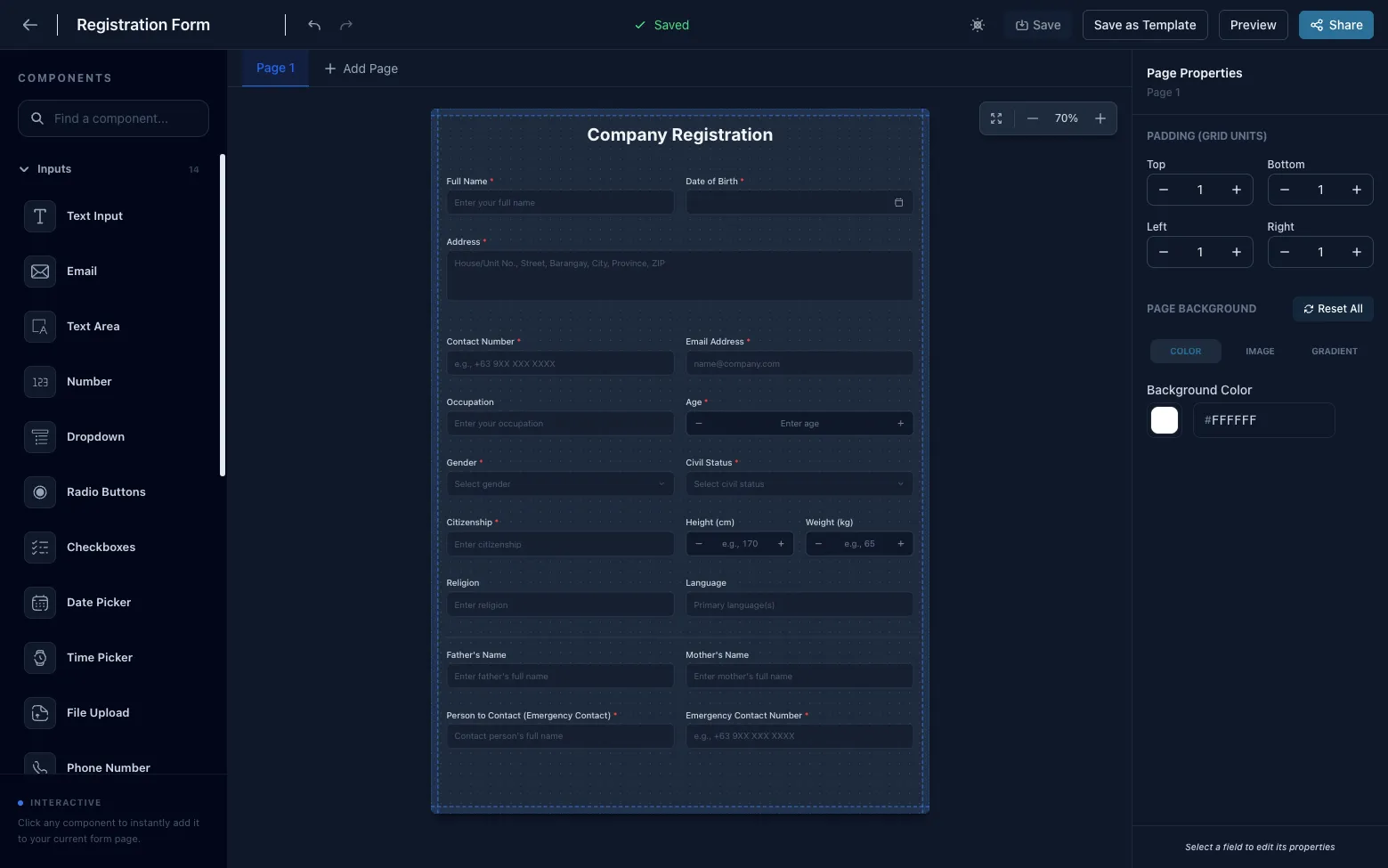
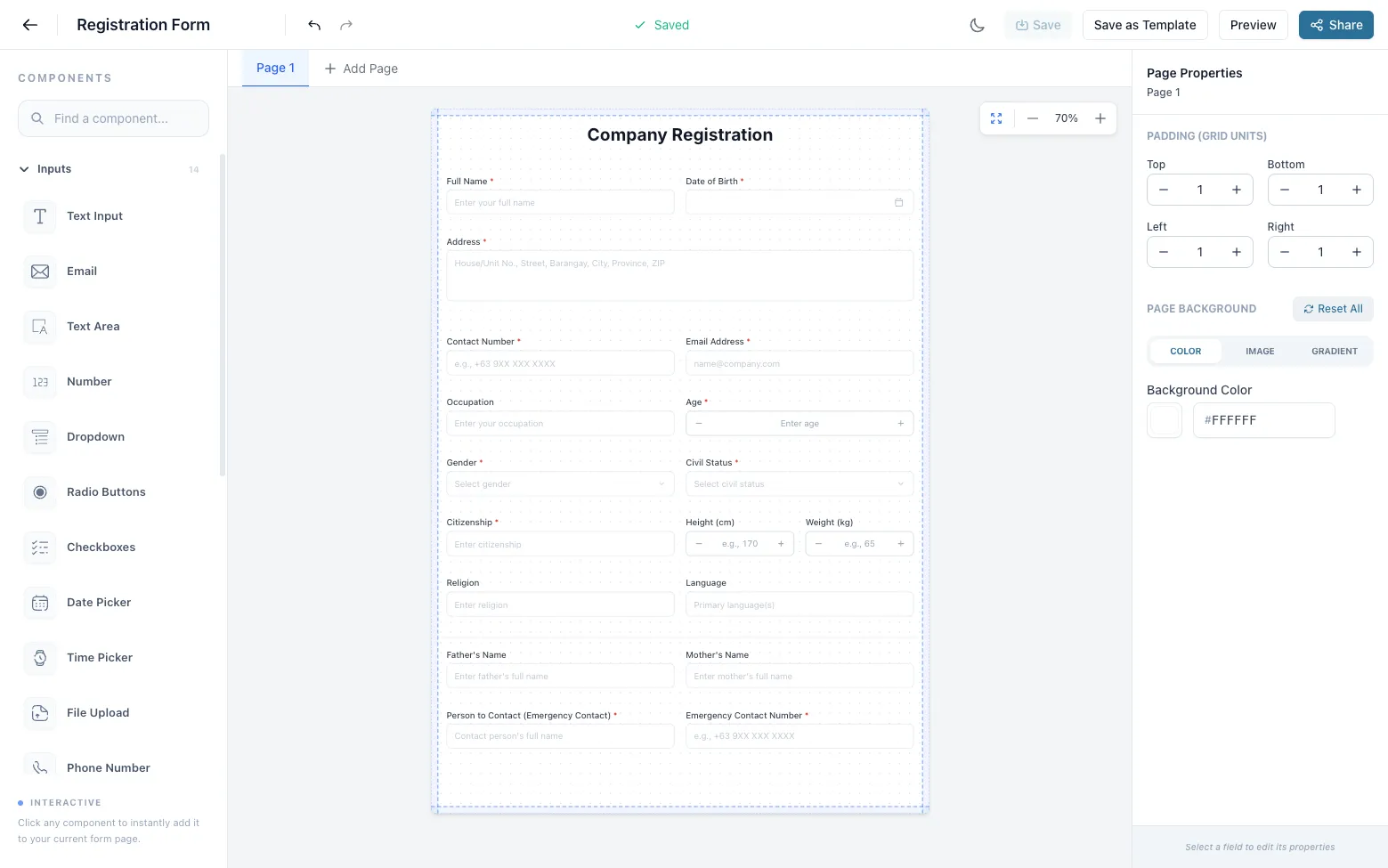
Light & Dark mode - your workspace, your way
Switch themes instantly
Users can switch between light and dark modes instantly, reducing eye strain and matching their working environment. Your form stays the same.
“Switch themes anytime. Your form stays the same.”
Multi page forms that guide users step by step
Break long forms into simple steps
Users can split complex forms into multiple pages, categorize inputs logically, and create clear step-by-step flows that improve completion rates.
“Break long forms into simple steps.”
Flexible layouts - from one column to full grid control
Design forms like layouts, not lists
Each row can contain multiple input fields and layouts can range from simple single column forms to complex multi column designs.
“Design forms like layouts, not lists.”
Beautiful backgrounds that match your brand
Visual polish without design tools
Users can add background colors, images, and gradients, and fine tune appearance using brightness, opacity, contrast, blur, etc.
“Visual polish without design tools.”
More than inputs - build complete form experiences
Forms that communicate, not just collect
Users can add headers, images, paragraphs, dividers, and decorative elements to guide users and tell a story.
“Forms that communicate, not just collect.”
Contact Us
We'd love to hear from you. Fill out the form below.
Preview exactly what users will see
No surprises after publishing
Users can preview the final form before publishing, ensuring layout, spacing, and visuals are perfect.
“No surprises after publishing.”
Responsive by default - no extra work
Design once. Works everywhere
Forms work seamlessly on desktop, tablet, and mobile, without breaking layouts or requiring separate designs.
“Design once. Works everywhere.”
Control input sizes with ease
Right size for every field
Users can configure input sizes (small, medium, large) to emphasize important fields or save space.
“Right size for every field.”
Auto save - always on
Focus on building, not saving
Every change is saved automatically, so users never lose work or need to think about saving.
“Focus on building, not saving.”
Turn any form into a reusable template
Build once. Reuse forever.
Users can save forms as templates and reuse or share them to build new forms faster.
“Build once. Reuse forever.”
Control who can access your forms
Security when you need it
Two access modes: Public (anyone with link) and Restricted (OTP, country lock, password, etc.).
“Security when you need it.”
Smart Guides for perfect alignment
Pixel perfect layouts made easy
Smart guides help align inputs precisely while resizing and moving components.
“Pixel perfect layouts made easy.”
Fast editing with keyboard shortcuts
Build faster without touching the mouse
Support for copy, paste, duplicate, delete, arrow key positioning, etc.
“Build faster without touching the mouse.”
Undo and redo without fear
Experiment freely
Users can safely undo and redo changes while designing forms.
“Experiment freely.”
Frequently Asked Questions
What makes FormPlayground's builder different?
Unlike traditional form builders that stack fields vertically, FormPlayground uses a grid-based canvas. This gives you total freedom to place fields side-by-side, resize them, and create complex layouts like a design tool.
Can I create multi-page forms?
Yes! You can easily break long forms into multiple steps. This improves completion rates by guiding users through a logical flow rather than overwhelming them with a single long list.
Are the forms mobile-responsive?
Absolutely. While you have total layout freedom on desktop, our engine automatically optimizes the layout for mobile devices to ensure a perfect experience on every screen size.
Do I need to save my work manually?
No, the builder features an auto-save system that captures every change you make in real-time. You can focus on building, and we'll handle the saving.
Can I brand the forms with my own colors?
Yes, you have full control over background colors, gradients, images, and fonts. You can fine-tune every visual element to match your brand perfectly.
Explore more features
Ready to build better forms?
Join thousands of designers and creators using FormPlayground to build stunning, high-conversion forms.